
.png)
Description
Download Text to Speech Reader – Boost Productivity with AI Voice, PDF & Word Conversion
Overview
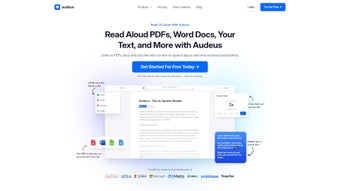
Audeus Text to Speech Reader is a cutting‑edge web‑based application that transforms any written content—PDFs, Microsoft Word documents, web pages, or plain text—into natural‑sounding spoken audio. Designed for students, researchers, professionals, and anyone who consumes large volumes of information, the tool lets users listen to text while simultaneously highlighting each word on screen. This dual‑sensory approach improves comprehension, reduces eye strain, and enables multitasking, whether you’re commuting, exercising, or simply prefer an auditory learning style. The platform runs entirely in the browser, so there’s no heavy installation, and it guarantees secure handling of your documents; files are processed locally and never stored on external servers unless you explicitly enable cloud sync. Audeus also offers an intuitive UI that lets you drag‑and‑drop files, paste URLs, or type directly into the editor. Once the text is loaded, you can select from a catalog of lifelike AI voices, adjust speaking speed, and enable sentence‑by‑sentence highlighting. The built‑in bookmarking feature remembers where you left off, while the export option lets you save the audio as MP3 for offline playback. In short, Text to Speech Reader by Audeus combines powerful conversion capabilities with a user‑centric design, making it a reliable productivity booster for any workflow.
Key Features
- Multi‑format support: Seamlessly import PDFs, DOCX, TXT, and web URLs.
- Real‑time text highlighting: Words are highlighted as they are spoken, reinforcing visual learning.
- Customizable AI voices: Choose from male, female, and regional accents with high‑fidelity speech synthesis.
- Adjustable reading speed: Slow down for dense academic material or speed up for light‑reading content.
- Bookmark & resume: The app automatically saves your position, allowing you to pick up exactly where you left off.
- Offline audio export: Convert any document to MP3 for listening on any device without an internet connection.
- Secure processing: All conversions happen in‑browser; no personal data is transmitted to external servers.
- Responsive design: Works flawlessly on desktops, tablets, and smartphones.
- Integrated dictionary: Click any highlighted word to view definitions, synonyms, or translations.
- Batch processing: Upload multiple files at once and queue them for continuous playback.
Installation & Compatibility
Quick Setup – No Download Required
Because Audeus Text to Speech Reader is a web application, there is no traditional installation process. Users simply navigate to the official site, create a free account (optional for syncing preferences), and start converting documents instantly. The platform leverages modern WebAssembly and Web Speech APIs, ensuring fast, client‑side processing. For those who prefer a desktop shortcut, the service offers a “Add to Home Screen” feature on Chrome, Edge, and Safari, turning the web app into a pseudo‑native app with a single click.
Operating System Support
The reader runs on any operating system that supports a modern browser, including Windows 10/11, macOS Monterey and later, Linux distributions (via Chrome or Firefox), Android 8.0+, and iOS 13+. Because the processing occurs locally, performance depends more on CPU speed and available RAM than on OS version. Minimum recommendations are a dual‑core processor, 4 GB RAM, and a stable internet connection for voice‑model updates.
Browser Compatibility
Supported browsers are Chrome, Edge, Firefox, and Safari (latest two major releases). Older browsers may lack full speech‑synthesis support, resulting in fallback to slower JavaScript‑based TTS engines. For the best experience, enable hardware acceleration in your browser settings and keep your graphics drivers up‑to‑date.
Step‑by‑Step Usage Guide
- Visit audeus.com/tts-reader and sign in or continue as a guest.
- Click the “Upload” button and drag your PDF, DOCX, or TXT file into the drop zone, or paste a web URL.
- The document is parsed automatically; you’ll see a preview with highlighted headings.
- Select a voice from the dropdown menu. Adjust the speed slider to your preferred rate.
- Press “Play” to start listening. The text will be highlighted word‑by‑word in real time.
- Use the “Bookmark” icon to save your spot, or click “Export MP3” to download an audio file.
- Access the “Settings” panel to enable cloud sync, change language, or customize UI themes.
All of these steps are designed to be intuitive, meaning you can go from file upload to audible playback in under a minute. The platform also includes a built‑in tutorial video for first‑time users, which can be accessed from the Help menu.
Pros, Cons & Frequently Asked Questions
Pros
- Zero‑install, browser‑based solution – works on any device.
- Lifelike AI voices with regional accents improve listening comfort.
- Real‑time highlighting bridges visual and auditory learning styles.
- Secure, client‑side processing protects sensitive documents.
- Export to MP3 for offline listening on any media player.
- Free tier includes unlimited conversions; premium adds extra voices and batch processing.
Cons
- Requires a modern browser; older versions may lack full feature set.
- Audio quality depends on internet speed for voice‑model updates.
- Batch processing is limited to ten files on the free plan.
- Complex layouts (e.g., multi‑column PDFs) may lose formatting during conversion.
FAQ – Frequently Asked Questions
Can I use Text to Speech Reader offline?
Yes. After loading a document, you can export the audio as an MP3 file and listen offline on any device. The core conversion still requires an internet connection to load the latest voice models, but once the audio is generated you’re free of any connectivity constraints.
Is my data stored on Audeus servers?
No. All document processing happens locally in your browser. The only data sent to Audeus servers are optional preferences you choose to sync, such as selected voice or reading speed. These are encrypted and can be disabled at any time.
Which languages are supported?
The free tier supports English, Spanish, French, German, and Italian. Premium users gain access to additional languages, including Mandarin, Japanese, Portuguese, and several regional dialects.
How does the reading speed affect comprehension?
Research shows that moderate speeds (around 1.0‑1.2× normal) improve retention for most users, while higher speeds can be useful for skimming. The app lets you experiment with fine‑grained increments (0.1× steps) so you can find the sweet spot for your personal learning style.
Can I integrate the reader with other tools like Notion or Google Docs?
Direct integration isn’t built‑in yet, but you can copy‑paste text from Notion, Google Docs, or any web editor into the Audeus interface. Future updates plan to add browser extensions for one‑click conversion from these platforms.
Overall Verdict: Audeus Text to Speech Reader stands out for its zero‑install accessibility, high‑quality AI voices, and thoughtful UI that blends listening with reading. While it could improve batch limits on the free plan, the security‑first architecture and cross‑platform reach make it a top choice for anyone looking to turn text into an engaging audio experience.
Conclusion – Take Your Reading to the Next Level
If you spend hours scrolling through PDFs, research papers, or lengthy articles, Audeus Text to Speech Reader offers a seamless way to convert that visual overload into an audible, hands‑free experience. The combination of real‑time highlighting, lifelike voices, and secure, browser‑based processing means you can boost productivity without sacrificing privacy. Whether you’re a student trying to absorb lecture notes, a professional reviewing contracts on a commute, or a language learner polishing pronunciation, the tool adapts to your pace and preferences. The free tier already provides unlimited conversions, and the premium upgrade unlocks premium voices and batch‑processing power for power users. Ready to listen smarter? Download Text to Speech Reader now and start turning any document into an immersive audio session today.
Guides & Tutorials for Text to Speech Reader by Audeus
How to install Text to Speech Reader by Audeus
- Click the Preview / Download button above.
- Once redirected, accept the terms and click Install.
- Wait for the Text to Speech Reader by Audeus download to finish on your device.
How to use Text to Speech Reader by Audeus
This software is primarily used for its core features described above. Open the app after installation to explore its capabilities.
User Reviews for Text to Speech Reader by Audeus 0
No reviews found




